
Senior-engineer workflows, current-product verification, and publication-ready screenshots
Source: 27-minute Cursor deep-dive video and supplied TTML transcript. Product details checked against current Cursor documentation (October 2026).
Cursor is easy to misunderstand if you approach it as “VS Code with a chatbot.” The more useful mental model is closer to an engineering teammate embedded inside the editor: fast, broadly knowledgeable, able to search and change a codebase, but only as good as the context and constraints you give it.
That distinction is the thread running through the workflow demonstrated in the source video. The creator does not simply ask Cursor to “build an app.” Instead, he works on an intentionally incomplete task-management project and increases the AI’s responsibility in stages. Small edits stay local. Multi-file work moves into Agent. Larger features start with a plan. Repeated team conventions become rules and commands. Independent tasks are split across worktrees. Cloud work is delegated only when the task is well defined. Every stage ends with human review.
The result is a more useful way to think about AI-assisted development: intent, context, constraints, validation, repeat.
The Project Used Throughout the Tutorial
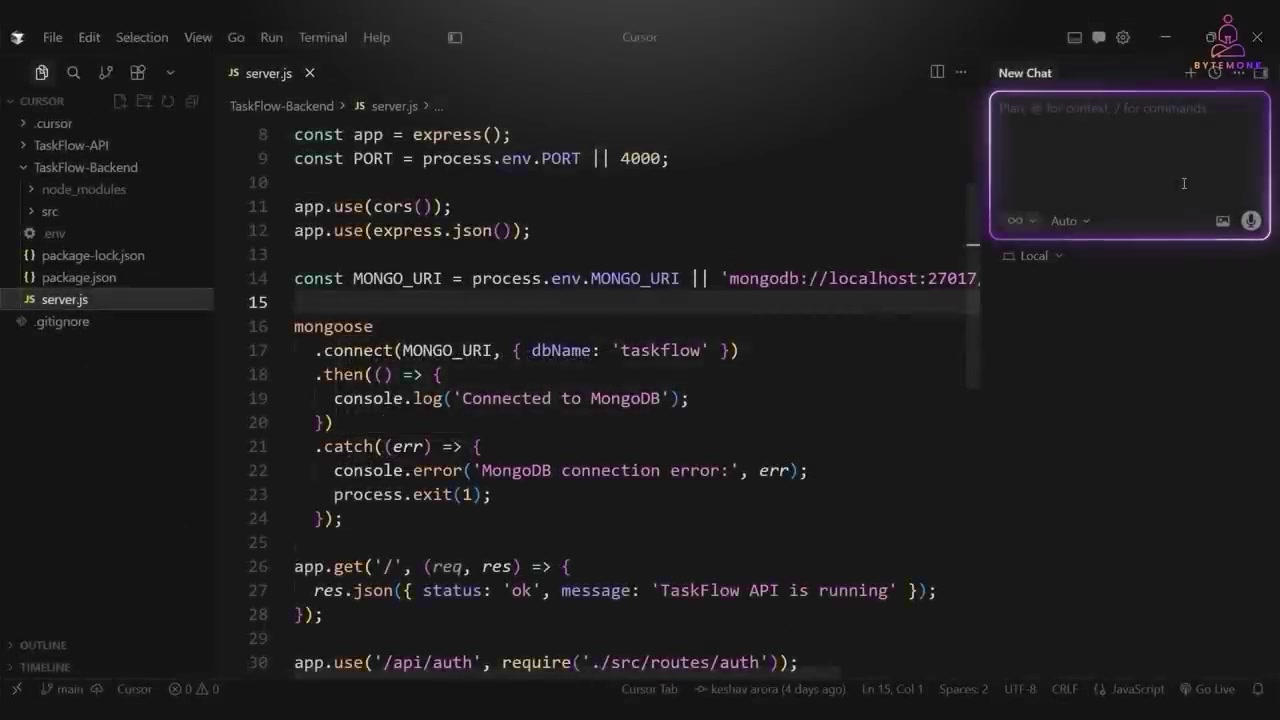
The video uses a deliberately unfinished task-management application as a running example. It has users, tasks, projects, and notifications, with a backend service and a web front end. The point of the demo is not the specific stack. The unfinished project creates realistic opportunities to show how different Cursor features fit different levels of engineering work.
The progression looks roughly like this:
- fix missing error handling in a notification service;
- debug a failing notification flow using terminal output and code context;
- add a multi-layer task-label feature through Plan Mode and Agent;
- encode project conventions as persistent rules;
- turn repeated structured-logging instructions into a reusable command;
- run independent pagination, test, and bug-fix tasks in parallel;
- delegate a well-scoped change to a cloud agent;
- add automated PR review with Bugbot;
- connect current framework documentation through MCP;
- add hooks around the agent loop for formatting, policy, or automation.
That sequence matters. It is a practical escalation ladder: give the AI more autonomy only when the task, context, and recovery path are clear.
Start With the Right Mental Model: A Brilliant New Engineer With No Local History
The creator’s strongest analogy is that Cursor’s AI is like a very capable engineer who just joined your team. It may know languages, frameworks, design patterns, and common architecture, but it does not automatically know why your project has a strange folder layout, why a legacy module cannot be touched, how your team names database functions, or which convention won a six-month-old architecture debate.
Without that local knowledge, the model tends to produce code that can be technically valid yet wrong for the repository. The fix is not a longer generic prompt. The fix is targeted project context.
This is also where an important current-product update belongs. The video makes it sound as though you must manually tell Cursor which code matters every time. Current Cursor Agent is better at searching a workspace on its own. The official prompting guidance now says to use @ mentions when you already know which files, folders, terminals, diffs, or browser context are relevant; if you do not know, Agent can search for the relevant files itself. In other words, manual context is still powerful, but it is no longer the only route to codebase context.
The durable lesson remains the same: relevance beats volume. A precise error, the two files involved, and a clear success condition usually beat dumping an entire repository into a request.
The Cursor tool profile summarizes the product features used throughout this workflow.
Three Levels of AI Involvement: Tab, Inline Edit, and Agent
The video teaches three interaction styles: Tab, Command K, and Chat. Cursor’s terminology and shortcuts have evolved, but the underlying division is still useful.
For a guided path through the fundamentals first, use our Cursor crash course for beginners.
1. Tab: Stay in Flow
Tab is the least interruptive layer. Instead of waiting for a full conversation, Cursor predicts the next edit from the surrounding code and your recent actions. The video emphasizes a small habit that is easy to overlook: after accepting one good suggestion, press Tab again. Cursor often predicts the next logical change from the edit you just accepted.
This makes Tab especially effective for repetitive transformations, boilerplate, adjacent conditionals, tests with similar structure, and patterns where the local intent is obvious.
The discipline is equally important: reject a bad suggestion quickly. Do not wrestle with autocomplete. Hit Escape, keep typing, and let the model recalibrate from your next edit.
2. Inline Edit: Make a Precise Local Change
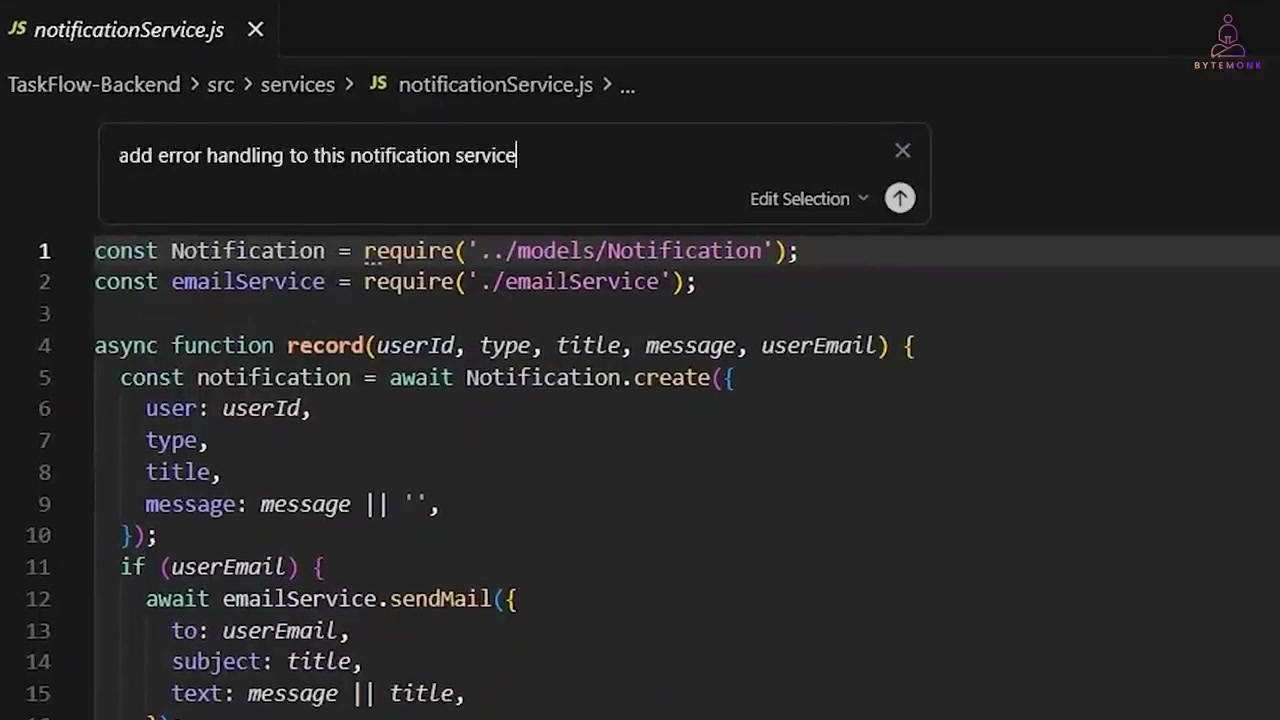
The video’s Command K demonstration highlights a block in notificationService.js and asks Cursor to add error handling. Cursor produces a focused diff instead of roaming across the repository.
The useful pattern is simple:
select → instruct → review
Good inline-edit requests are bounded: “convert this to async,” “add type annotations,” “add error handling,” or “refactor this block.” The moment the change depends on several files, architectural reasoning, migrations, or broader repository search, move to Agent.
Current Cursor documentation still supports inline edit with Cmd/Ctrl+K. The video also shows Command K in the terminal for generating shell commands from plain English; because Cursor’s terminal and Agent tooling have changed substantially, treat that exact terminal shortcut behavior as version-specific. The modern durable idea is that Agent can run and reason over terminal commands directly.
3. Agent: Reason Across Files and Tools
For debugging and feature work, the video moves into the chat/Agent experience. The example combines terminal output with notificationService.js, giving the model both the error and the code that produced it.
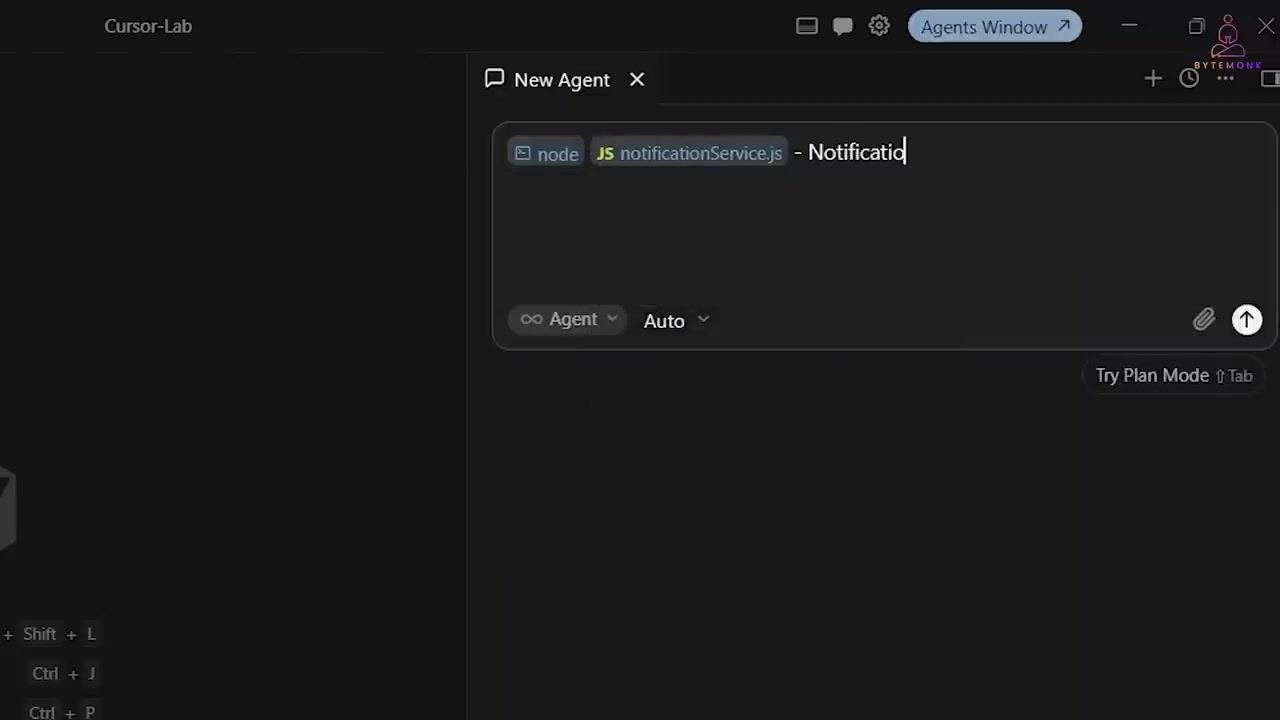
This is a good illustration of a broader rule: give the model the evidence that a human debugger would ask for. An error trace without code is incomplete. Code without runtime evidence is incomplete. For UI problems, add a screenshot or browser state as well.
The video also recommends opening a fresh conversation for a fresh task. That guidance still matches Cursor’s current docs. Stale context can bias a new request toward assumptions from the previous problem. One task per conversation is not a rigid law, but it is a strong default when the goal changes materially.
Another useful technique is to reference a previous Git change rather than restating a whole pattern. If error handling was implemented correctly in one service, point Cursor to that commit or diff and ask it to mirror the pattern elsewhere. This turns your repository history into a source of implementation examples.
Plan First, Then Let Agent Build
The centerpiece of the video is a two-phase workflow for non-trivial work: Plan Mode first, Agent implementation second.
The example is a task-label feature with labels such as “urgent,” “blocked,” and “in review.” The feature touches storage, API behavior, and the UI, so it is exactly the kind of request that can go wrong when you jump straight to “build this.”
In Plan Mode, Cursor first researches the codebase and produces a reviewable implementation plan rather than immediately editing files. The plan lays out schema changes, backend work, UI updates, and a checklist. The developer can remove out-of-scope work, change the approach, or clarify requirements before any code is generated.
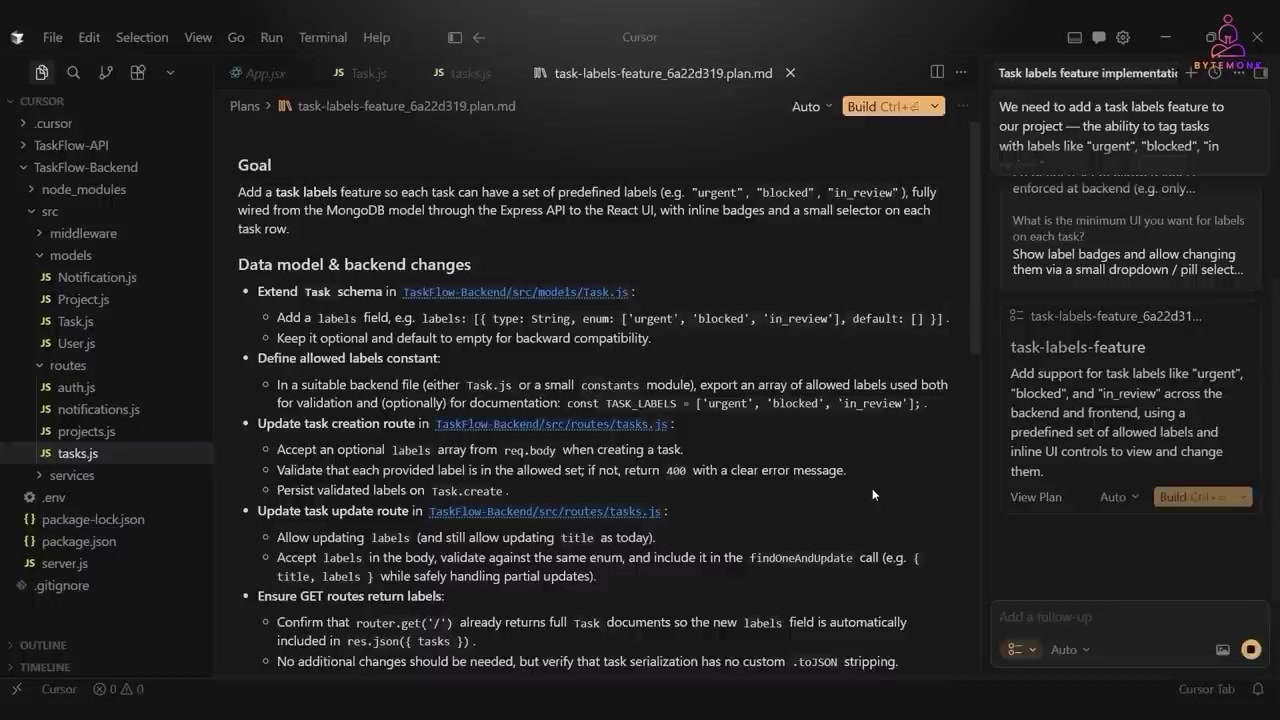
Once the plan is correct, the developer starts the build. Cursor works through the steps while the human monitors the result.
This is not ceremony for ceremony’s sake. The cost of correcting a flawed architecture after 15 files have changed is much higher than the cost of correcting one paragraph in a plan.
Current Cursor documentation still treats Plan Mode as the right choice for complex, multi-file, or architecturally ambiguous work. Plans can be reviewed and edited before clicking Build. For quick, well-understood changes, going directly to Agent remains reasonable.
Our Cursor AI Review 2026 gives a broader assessment of Agent, Tab, Cloud Agents, and current limits.
Two Safety Habits Matter More Than Any Prompt Trick
The video repeatedly comes back to two operational habits.
Commit before a large agent run. A clean Git checkpoint gives you a reliable recovery path if the agent takes the implementation in the wrong direction.
Test before you accept the work as finished. Generated code existing in your working tree is not the same thing as verified code. Run the application, exercise the behavior, inspect the diff, and check the tests before merging or shipping.
The creator also suggests using a second review pass after the implementation. Cursor now has several review surfaces, including built-in change review workflows and Bugbot. The exact button names may change, but the principle is durable: the model that wrote the code should not be your only quality gate.
Rules: Turn Repository Knowledge Into Persistent Guidance
Once a project survives more than a few sessions, repeating the same architecture instructions becomes wasteful. Rules are how you encode stable expectations so Agent can apply them consistently.
The video shows a rules-generation workflow that scans existing patterns, imports, and file structure, then creates a starter set of project instructions.
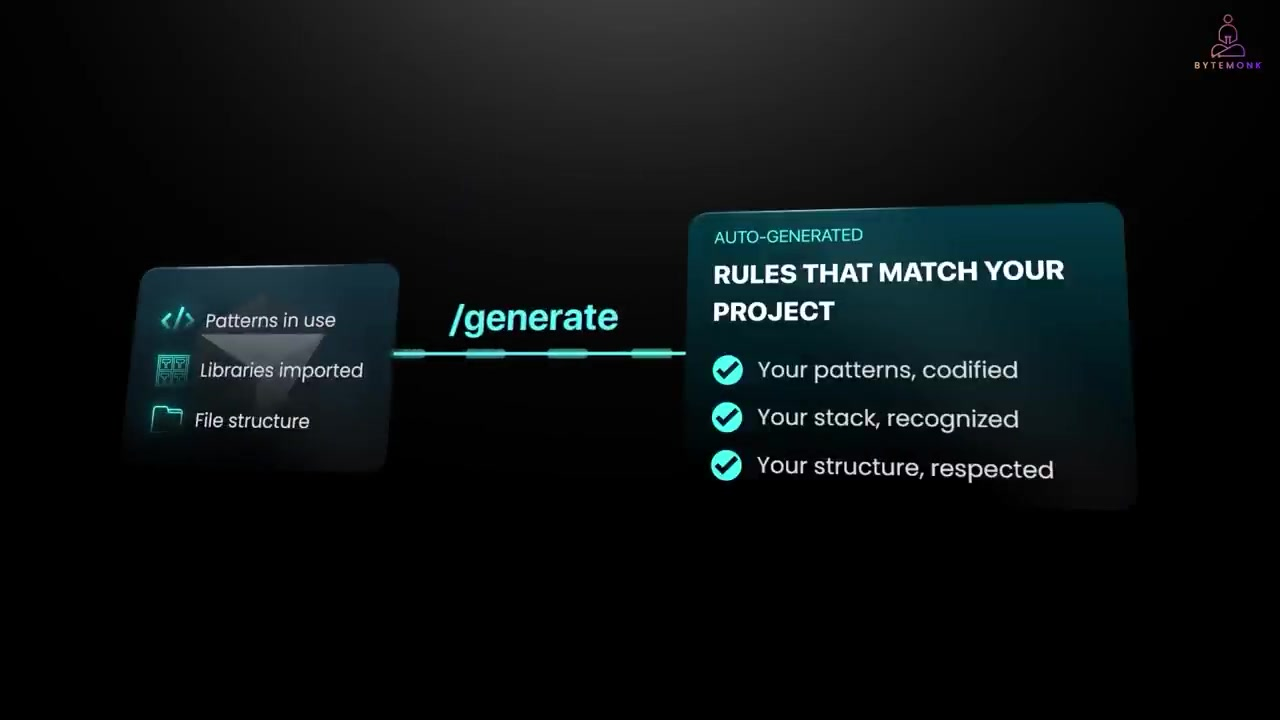
The idea is sound, but the exact command in the video is dated. Cursor’s current documentation recommends /create-rule or the Customize interface rather than relying on the older /generate flow.
Current Cursor supports four rule sources:
1. Project Rules in .cursor/rules, version-controlled with the repository.
2. User Rules for personal preferences across projects.
3. Team Rules distributed through team administration.
4. AGENTS.md files as a plain-Markdown instruction format.
Project Rules can also be scoped with file patterns. That matters because rules are context, and irrelevant context is still noise. A backend rule about database access should not be injected into an unrelated front-end task if it does not help.
The creator also points viewers to cursor.directory for community examples. That resource remains relevant, but treat community rules as templates rather than truth. The useful workflow is to borrow structure, then adapt it to your repository and review it like any other source of engineering policy.
Commands: Turn Repeated Prompts Into Team Workflows
Rules describe how the agent should generally behave. Commands package a repeated task into something you can invoke on demand.
In the video, the team needs structured logging in three services. Instead of writing the same detailed request three times, the creator puts the instructions in a Markdown command: import the logging library, create the logger, add contextual start logs, log exceptions, and follow a provided example.
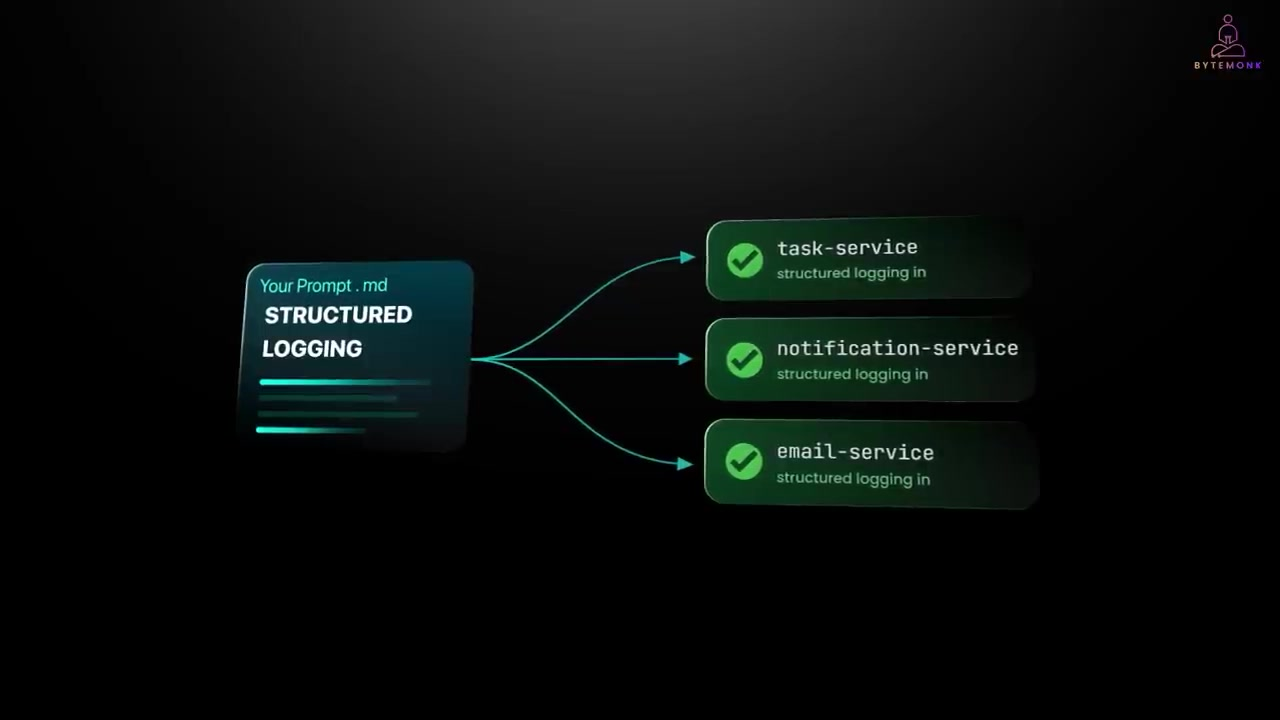
The heuristic is excellent: if you have written essentially the same detailed prompt more than twice, consider turning it into a reusable command.
Cursor still supports custom commands as Markdown files in .cursor/commands/, invoked from the Agent input with /. Because the directory lives in the repository, teams can version-control useful workflows along with the code.
This is where AI assistance stops being an individual productivity trick and starts becoming engineering infrastructure. A good command can capture the team’s preferred way to write tests, prepare a pull request, migrate an API version, add observability, or run a release checklist.
What About “Memories”?
The video groups rules, commands, and memories together as persistent context. The product has evolved since then. In current official documentation, Memories are explicitly documented for Cloud Agent Automations, where an automation can keep named notes across runs. For ordinary editor work, rules, commands, skills, conversation search, and newer long-lived Projects are the clearer documented mechanisms for persistent or reusable context.
So the safest current interpretation is: do not assume every local Agent conversation shares a universal memory. Put important engineering constraints in an explicit, reviewable mechanism such as project rules or AGENTS.md.
Parallel Agents: Use Concurrency Only When Work Is Truly Independent
The advanced part of the video starts by splitting three unrelated tasks:
- add pagination to the task-list API;
- write unit tests for the notification service;
- track down the task-counter bug.
Because the tasks do not depend on one another, they can run simultaneously in isolated workspaces.
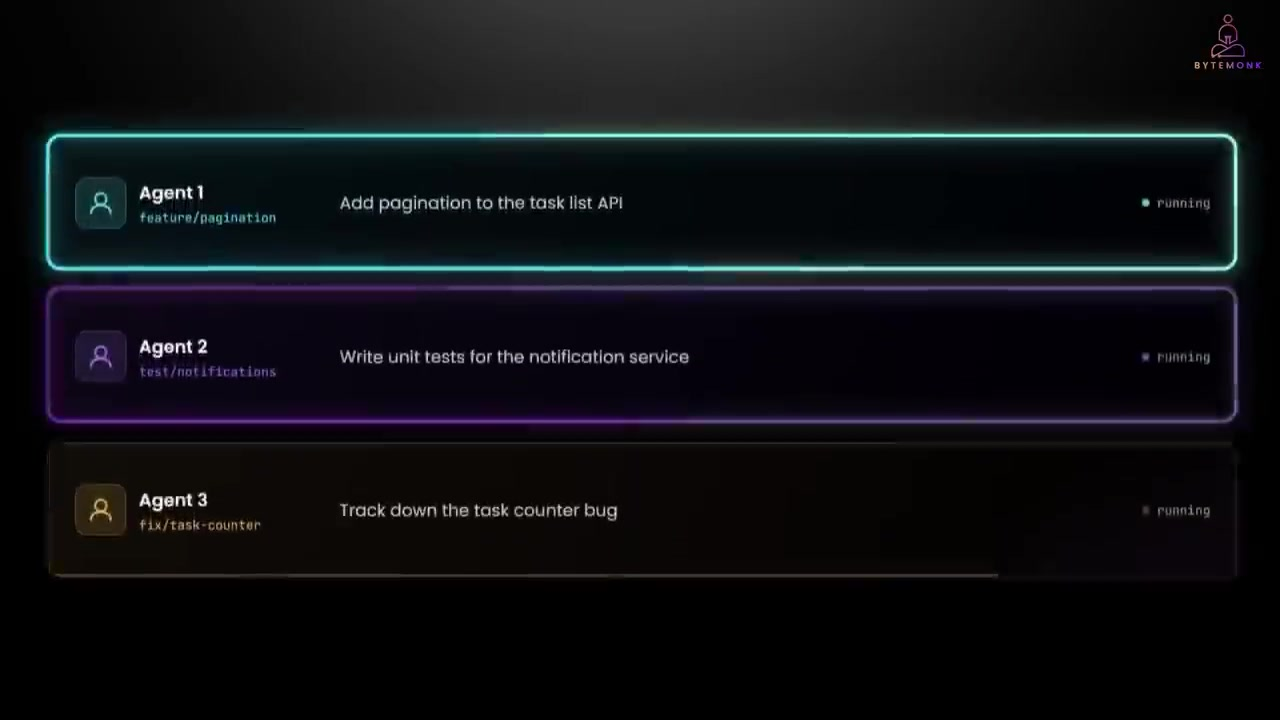
Cursor’s current worktree support formalizes this pattern. A worktree gives an agent its own isolated Git checkout so its changes do not collide with your main working directory or another agent’s edits. The Agents Window also supports multi-agent workflows and /multitask for parallel subagents.
The video’s warning is more important than the speedup: do not parallelize tasks that depend on one another’s output. If task B needs task A’s schema, interface, or branch to settle first, forcing concurrency often creates merge conflicts and rework.
Parallelism is not “more agents equals more productivity.” It is a scheduling problem. The right unit of parallel work is a task with a clean boundary and an independently reviewable result.
Cloud Agents: Delegate Well-Defined Work, Then Review the Pull Request
The next escalation is moving work off the local machine. Cursor’s current Cloud Agents run in isolated remote environments, clone authorized repositories, work on separate branches, run commands and tests, and can produce pull requests and artifacts such as screenshots or logs.
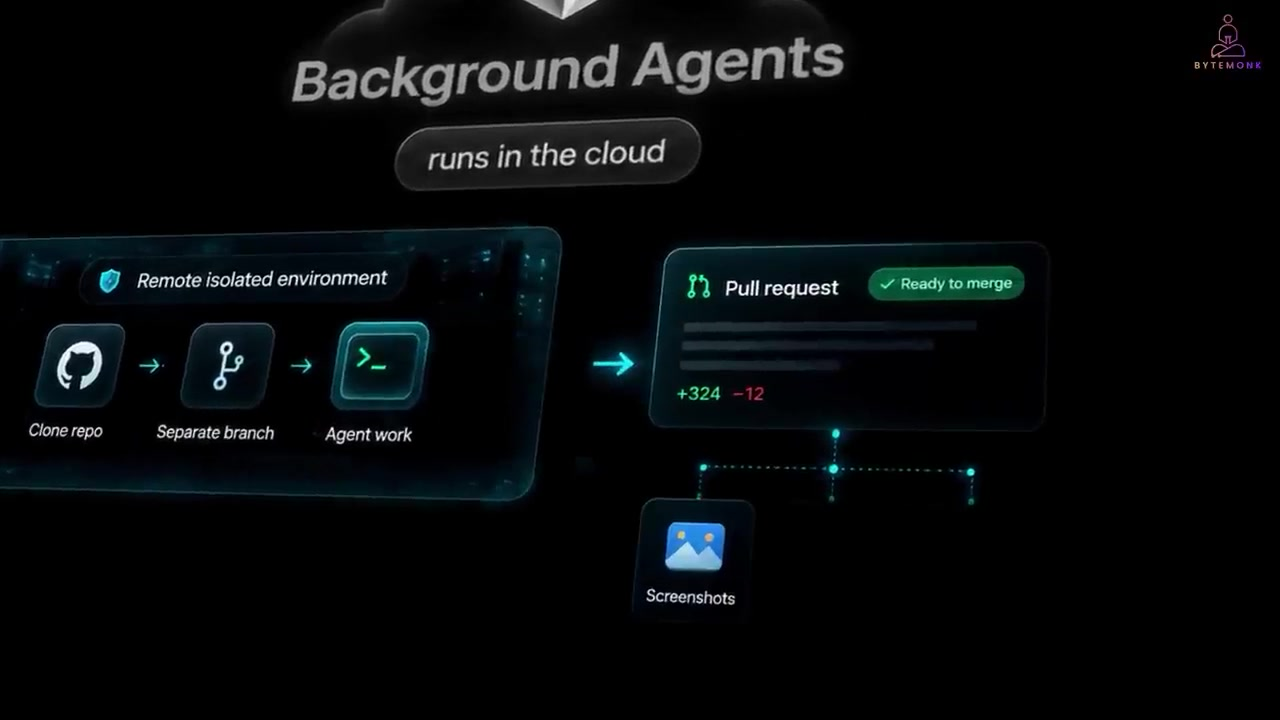
The creator’s advice is to treat a cloud-agent prompt like a good engineering ticket: clear scope, clear constraints, and clear acceptance criteria. That advice has aged well. Remote autonomy magnifies vague requirements just as surely as local autonomy does.
Current Cursor also lets teams start Cloud Agents from the desktop product, web, Slack, GitHub/Bitbucket, Linear, APIs, and other integrations. You can close the laptop because the execution environment is remote.
The Security Caveat Is Real, but the Details Matter
The video correctly pauses on the fact that cloud-agent work moves repository data into a remote environment. For regulated or highly sensitive repositories, that alone may trigger security review.
Current Cursor documentation provides more detail than the video: Cloud Agents run in isolated VMs, clone authorized repositories into those environments, encrypt data in transit and at rest, and support Privacy Mode. Cursor also documents retention behavior, network controls, secret handling, repository restrictions, and enterprise governance. Runtime workspaces are recycled, while some snapshots and conversation state have their own retention rules.
The practical takeaway is not “cloud agents are safe” or “cloud agents are unsafe.” It is: evaluate them against your organization’s data-handling requirements before enabling them on sensitive code. For restricted environments, review current security documentation with the same seriousness you would apply to any cloud development platform.
Bugbot: Make Automated Review Part of the Pull-Request Loop
After implementation, the video adds Bugbot as a continuous review layer. It connects to source control, analyzes pull-request diffs, and comments on potential bugs, security issues, and code-quality problems.
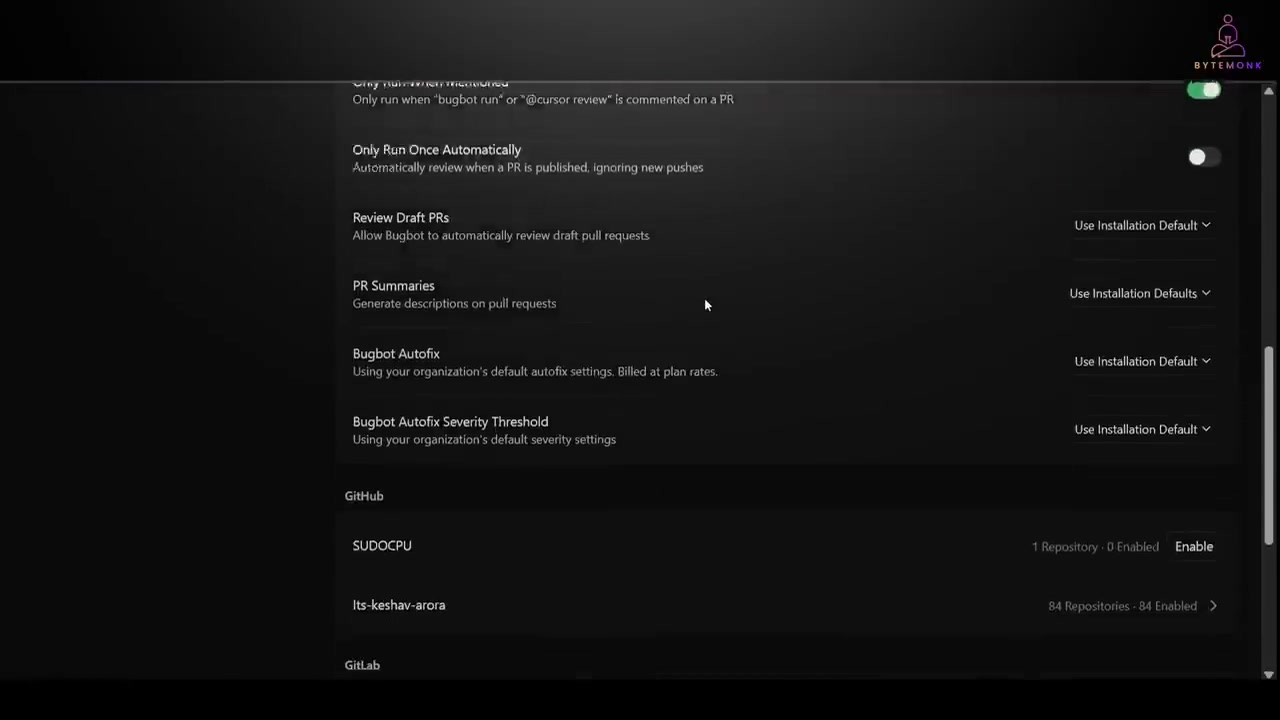
This feature has expanded since the recording. Current Cursor documentation supports automatic reviews, manual triggers such as cursor review or bugbot run, project-specific Bugbot guidance, and Autofix workflows that can spin up a Cloud Agent to address a reported problem.
The role is best understood as a first review pass, not a replacement for human code review. Let automated review catch obvious defects and repetitive mistakes so humans can spend more time on behavior, system boundaries, product tradeoffs, and architecture.
MCP: Bring External Tools and Current Documentation Into the Agent
Model Context Protocol (MCP) extends Cursor beyond the files already in the repository. MCP servers can expose tools and data from systems such as documentation sources, issue trackers, databases, design tools, and other services.
The video recommends Context7 as a first integration because framework APIs move faster than model training data. That recommendation is still concrete today: Context7 appears in Cursor’s current Marketplace as a verified Upstash integration for pulling version-specific documentation and code examples into model context.
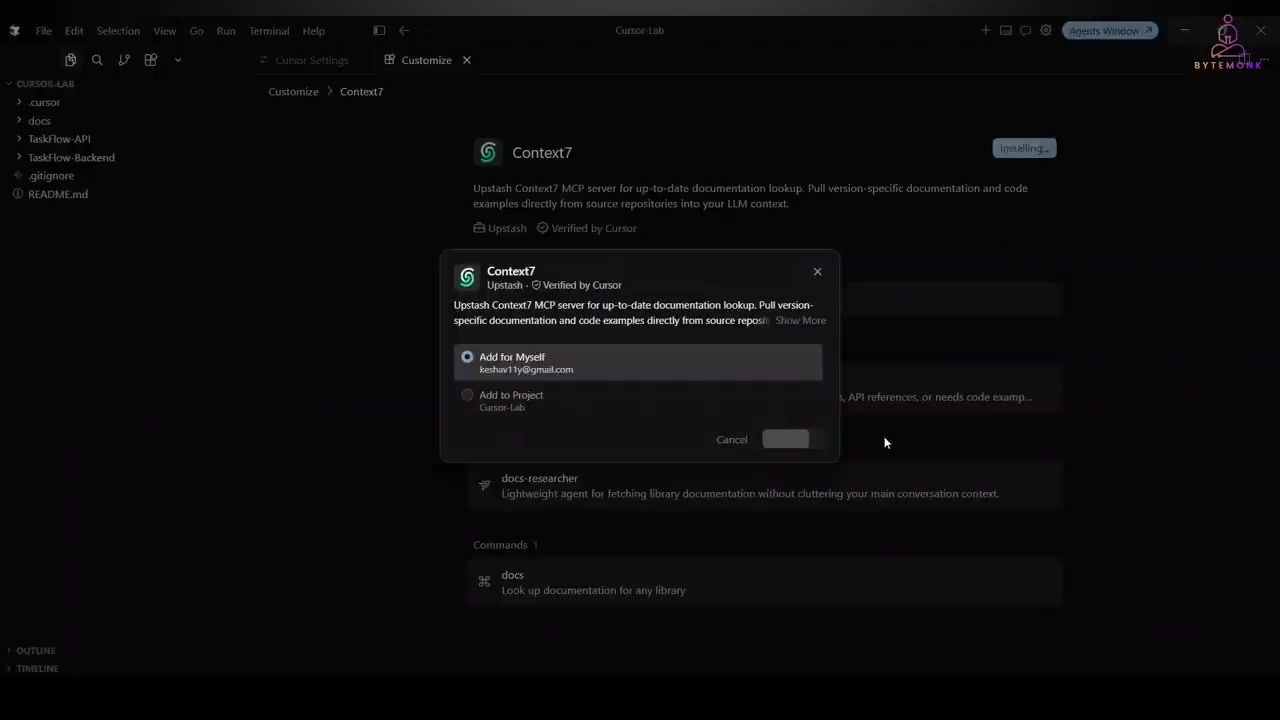
The more general lesson is to add integrations incrementally. A dozen MCP servers are not automatically better than two. Each integration increases the agent’s tool surface and the amount of context it may need to reason about. Start with systems you actually use every day.
For many teams, that means one documentation source, one source-control integration, and perhaps one issue tracker or testing tool. Add more only when the integration removes a real context switch.
Hooks: Put Deterministic Controls Around an AI Agent
The last advanced feature in the video is hooks: scripts that run at defined points in the agent lifecycle.
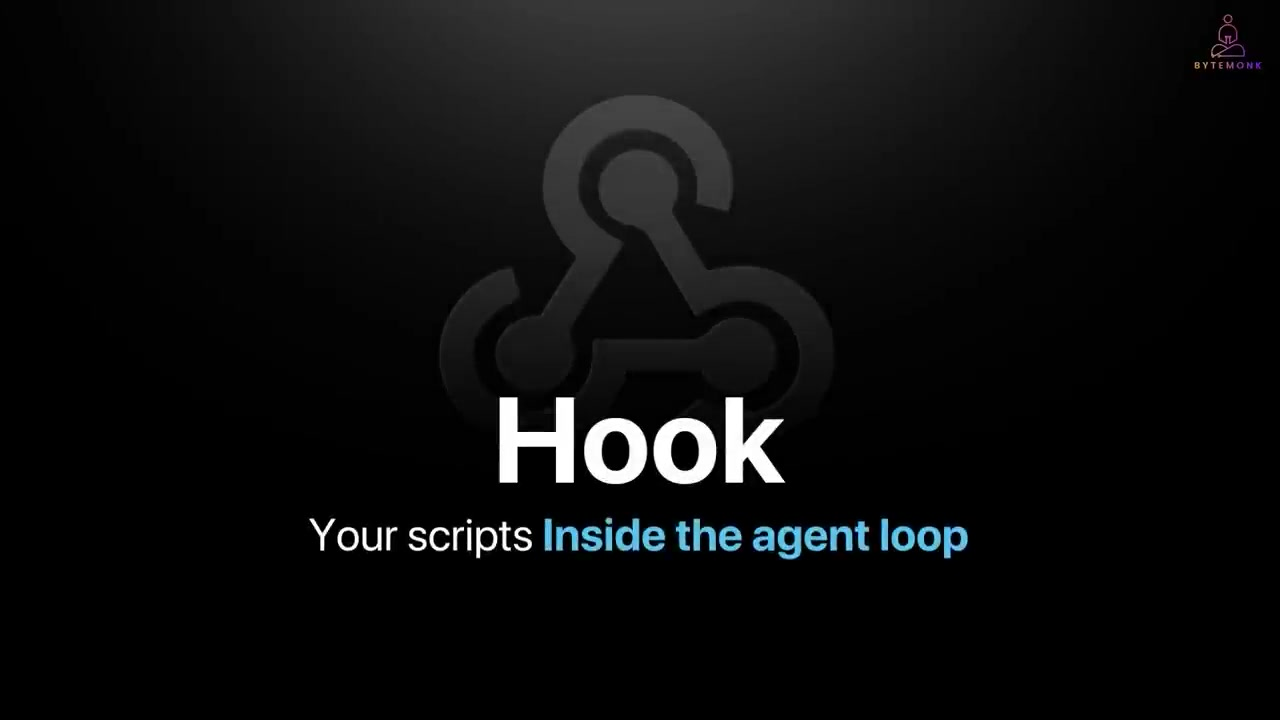
Current Cursor supports a much richer hook system than the short video segment suggests. Hooks can run around shell execution, file edits, MCP calls, prompt submission, agent lifecycle events, subagents, and more. That makes them useful for work that should not depend on a model “remembering” to do it.
Examples include:
- format code after the agent edits a file;
- block or require approval for risky commands;
- scan for secrets or sensitive data;
- log agent actions for observability;
- inject required context at session start;
- enforce organization-specific policy around tools or MCP calls.
This is an important architectural distinction. Rules are instructions to the model; hooks are executable controls around the model. If a requirement must be deterministic, a hook or CI check is often a better place for it than prose in a prompt.
25 Practical Cursor Habits Distilled From the Workflow
The video is packed with small tips. The most useful ones can be reduced to a working checklist:
1. Treat the AI like a strong engineer who still needs repository-specific onboarding.
2. Give relevant context, not the maximum possible context.
3. Use Tab for flow-state edits and repetitive local patterns.
4. Reject bad Tab suggestions immediately rather than fighting them.
5. Chain good Tab suggestions when Cursor correctly predicts the next edit.
6. Use inline edit for tightly scoped changes in one location.
7. Move to Agent when a task needs repository search, reasoning, or multi-file changes.
8. Attach specific files or tool output when you know they are relevant.
9. Let Agent search when you do not know which files matter yet.
10. Start a fresh conversation when the task materially changes.
11. For debugging, combine runtime evidence with the relevant code.
12. Add visual context for UI bugs instead of describing screenshots verbally.
13. Reuse a known-good Git diff or commit as an implementation example.
14. Start non-trivial feature work in Plan Mode.
15. Edit the plan before you let the agent build.
16. Attach requirements or a spec when they already exist.
17. Make a clean Git commit before a large autonomous edit.
18. Run the application and tests before treating generated code as done.
19. Use a second review pass for important changes.
20. Encode stable project conventions in version-controlled rules.
21. Scope rules so unrelated instructions do not pollute context.
22. Convert frequently repeated prompts into reusable commands.
23. Parallelize only tasks with genuinely independent boundaries.
24. Give Cloud Agents ticket-quality scope and acceptance criteria.
25. Put deterministic safeguards—formatting, policy, audits, security checks—into hooks, CI, or review automation rather than relying on prompts alone.
What Has Changed Since the Video Was Recorded?
The workflow is still useful, but a few product details should not be copied literally from the recording.
Model names are time-sensitive. The video recommends particular Claude Sonnet and Opus generations. Cursor still offers frontier Anthropic models, but the lineup has moved forward and now includes newer Claude, OpenAI, Google, xAI, and Cursor-served models. Choose models based on current availability, quality, latency, and cost rather than memorizing the video’s names.
The plan pricing example is still broadly accurate, but the plan lineup is larger. Cursor still lists a free Hobby tier and a $20/month Pro tier, alongside Pro+, Ultra, and team plans. Included usage and model routing have changed, so always check the current pricing page before making cost assumptions.
Agent navigation has evolved. The modern product has Agent, Ask, Plan, and Debug modes, an Agents Window, Cloud Agents, and Projects. Current docs use Cmd/Ctrl+I for the Agent panel and Shift+Tab to rotate through modes. The video’s Cmd+L-style chat workflow reflects an older interface.
Rules have expanded. Current Cursor documents Project, User, Team, and AGENTS.md rules. Rule creation now centers on /create-rule or Customize rather than the older /generate behavior shown in the recording.
Context selection is less manual. @ mentions remain useful, but current Agent can search the codebase when you have not already identified the right files.
Cloud-agent security has more formal controls. Cursor now documents VM isolation, encryption, privacy mode, network controls, secrets handling, repository scoping, and retention behavior. Security teams should review the current documentation rather than relying on a short product demo.
These changes do not invalidate the creator’s workflow. They make the underlying lesson even clearer: learn the decision framework, not the UI choreography.
Final Takeaway: Your Job Shifts From Typing to Directing and Validating
The strongest idea in the video appears near the end. In an agentic workflow, the developer’s job is not simply to type every line faster. It is to provide the right intent, surface the right context, define constraints, and validate the result.
That does not remove engineering judgment. It concentrates it.
A weak workflow says: “build this,” waits, then repairs whatever appears.
A strong workflow asks: What is the smallest tool that fits this task? What context matters? What should the plan be? What must never change? What is the recovery point? How will we test it? What can be automated as a rule, command, hook, worktree, review, or cloud job? What still requires a human decision?
That is why senior Cursor usage is less about memorizing shortcuts and more about building a disciplined delegation loop:
Intent → Context → Constraints → Execute → Validate → Repeat.
The better you get at that loop, the more useful stronger models become.
Current Product Sources
Current-product details in this article were checked against official Cursor documentation in October 2026:
- Pricing and plans: https://cursor.com/pricing and https://prod.cursor.com/help/account-and-billing/pricing
- Agent and prompting: https://cursor.com/docs/agent/overview and https://prod.cursor.com/docs/agent/prompting
- Inline edit: https://prod.cursor.com/help/ai-features/inline-edit
- Plan Mode: https://prod.cursor.com/docs/agent/plan-mode
- Rules: https://cursor.com/docs/rules
- Custom commands / customization: https://prod.cursor.com/docs/customize-cursor
- Worktrees: https://cursor.com/docs/configuration/worktrees
- Cloud Agents: https://cursor.com/docs/cloud-agent
- Cloud Agent security: https://prod.cursor.com/docs/cloud-agent/security
- Bugbot: https://cursor.com/docs/bugbot
- MCP: https://cursor.com/docs/mcp
- Context7 marketplace entry: https://cursor.com/marketplace/mcp/context7
- Hooks: https://cursor.com/docs/hooks