
AI Tool Video Article – publication package
| Excerpt Cursor Projects is more than a folder for chats. In this real website-refresh workflow, a Project reviews an existing plan, finds mistakes, rewrites it, delegates execution to agents, and exposes the work as a visible checklist. That makes agentic development much easier to understand even if pull requests, branches, and analytics IDs are not part of your everyday vocabulary. |
|---|
Cursor has always been easy to describe to developers: it is an AI-first coding environment that can inspect a repository, edit files, run commands, and help ship software. Explaining why a non-developer should care has been harder. A normal person looking at a list of repositories, branches, pull requests, terminals, and model names can reasonably wonder whether the product is solving a problem they actually have.
Projects changes that equation because it exposes something non-technical users understand immediately: a body of work with a goal, a plan, a status, tasks in progress, things that are blocked, and a place to ask questions without losing the thread.
The video behind this article is a useful example because the creator openly says he is not a developer. He is trying to refresh his own website, improve conversion rate optimization, and make the design feel better. Instead of pretending to understand every implementation detail, he uses a Cursor Project to review a plan, identify mistakes in it, revise the plan, and then execute the work while keeping the state visible.
That is the real lesson. Cursor Projects does not make software development non-technical. It makes a long-running software project easier to supervise in ordinary language.
What Cursor Projects is now
The video was recorded while the creator was unsure whether Projects had rolled out to everyone. That part has already changed.
Cursor officially launched Projects in September 2026. Current documentation says Projects is available on paid plans, including Enterprise, and that it is powered by Cloud Agents. A Project has a coordinator agent that plans and delegates work rather than writing all the code itself. The coordinator can create additional agents, keep long-running context, and bring completed work back for review.
That architecture matters because it explains why the interface feels different from a normal chat. A Project is not merely a conversation attached to a repository. It is designed around an ongoing objective.
Cursor says a Project can maintain context over months, share project files across cloud and local machines, delegate tasks to multiple agents in parallel, and react to recurring signals such as schedules, pull-request activity, CI runs, or Slack messages. Projects are not available on the free Hobby plan, and Cursor notes that they are also unavailable with its Legacy Privacy Mode because Project work runs on Cloud Agents.
For a non-developer, the simplest mental model is this:
A chat answers a request. A Project manages a body of work.
That distinction is exactly what the video demonstrates.
The example: refresh a real website, not a toy project
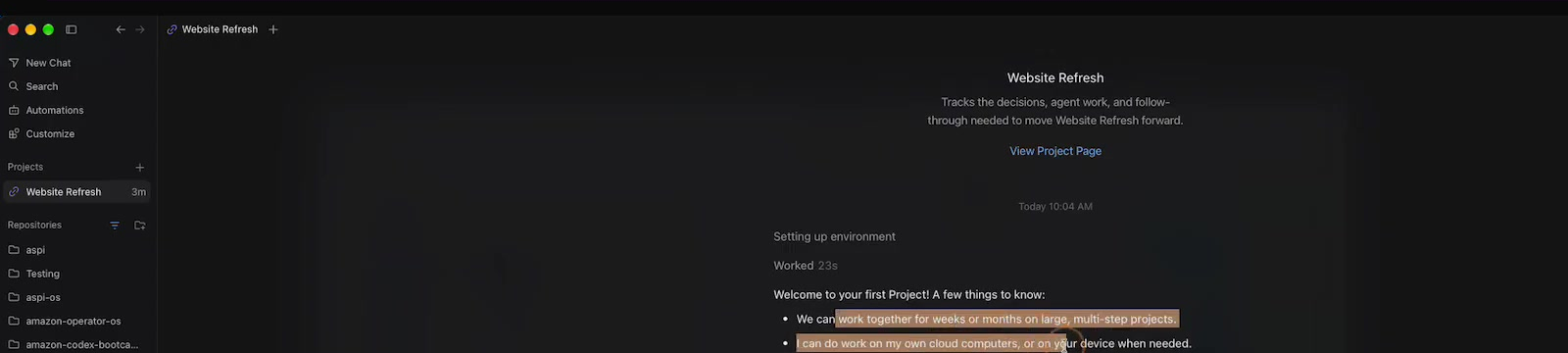
The creator begins with a practical goal: refresh his website. He creates a Project called Website Refresh and connects the GitHub repository that contains the site.
The Project immediately frames itself as a long-running collaborator. On screen, it explains that it can work together over weeks or months, use its own cloud computers or the user’s device when needed, and learn from feedback about how the user likes things done.
That language is not just marketing copy. It matches the way Cursor currently documents Projects: the coordinator maintains shared context and delegates to agents that do the implementation work.
For someone who does not think in terms of Git branches, the most important part is the project page itself. The repository becomes attached to a visible goal instead of appearing as one more technical object in a sidebar.
Start with review, not execution
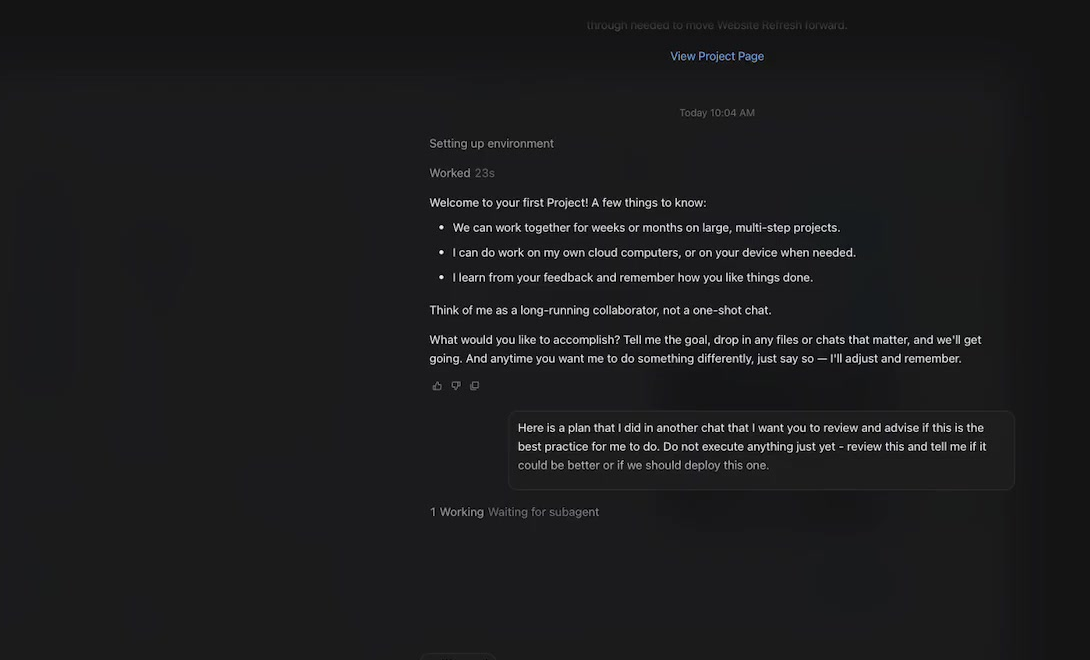
The creator had already used a separate chat to create a website-improvement plan. The plan covered conversion optimization, visual polish, motion, analytics, and other changes. Instead of dropping that plan into Cursor and saying “build this,” he makes a much safer request:
Review the plan against the actual codebase. Do not execute anything yet. Tell me whether it is sound, what is wrong, and whether it should be deployed as-is.
That is an excellent pattern for non-developers because it separates planning confidence from implementation authority.
An AI-generated plan can sound persuasive while being based on incorrect assumptions. A repository inspection is a chance to test those assumptions before code changes begin.
The video also makes the review more interesting by using the same model family on both sides. The original plan was generated with GLM 5.2, and the Project review also uses GLM 5.2. The creator expects the second pass to agree with the first. It does not.
That disagreement is useful evidence rather than a failure. It shows why the codebase should be treated as the source of truth, not the first answer produced by a model.
The Cursor tool profile provides context on the workspace used in this example.
Cursor’s model picker is convenient, but usage is still metered
One attraction for the creator is that Cursor exposes multiple models inside the same interface. The recorded picker includes Cursor models and third-party models such as GLM 5.2 and GPT-5.6 Sol, letting the user experiment without separately wiring a provider API key into every workflow.
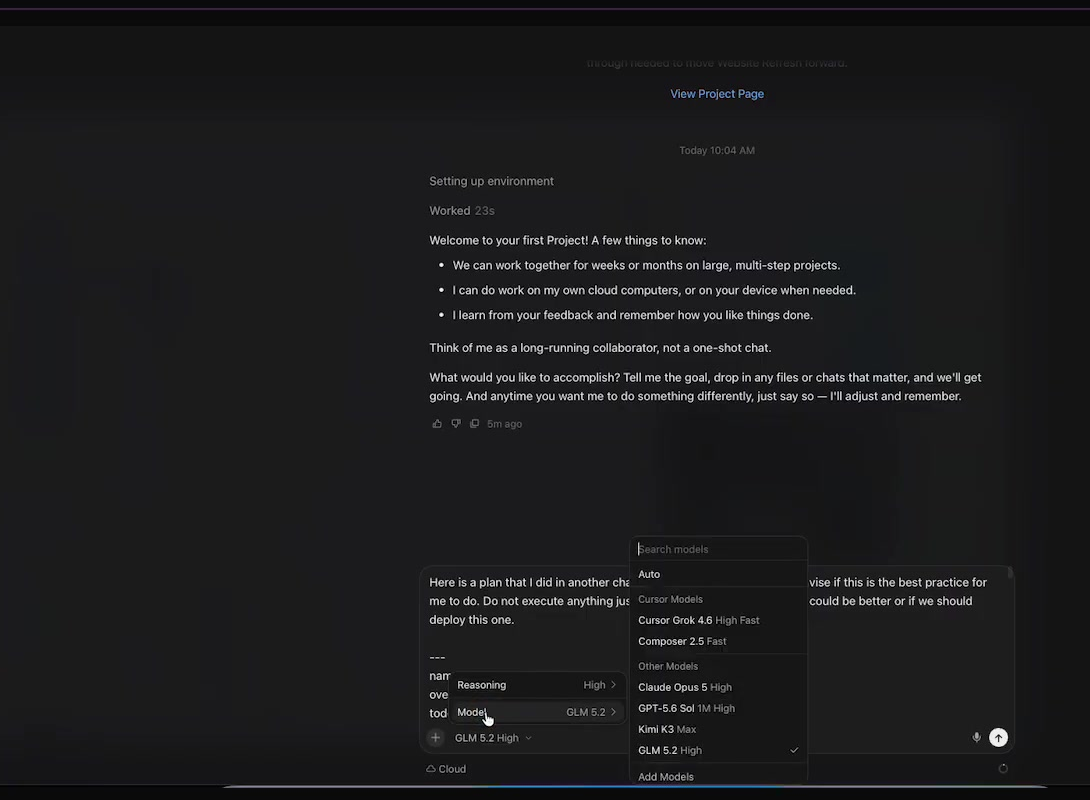
The convenience is real, but it should not be interpreted as unlimited free model access. Current Cursor plans use separate usage pools. Cursor’s own models draw from one pool, while third-party models draw from an Other Models pool and are metered at the relevant model rates. If included usage is exhausted, users can enable on-demand billing or move to a plan with more included usage.
Cursor’s current documentation still lists GLM 5.2, although it now recommends GLM 5.3 as the newer Z.ai option. Composer 2.5 is also current and is positioned as Cursor’s fast, cost-efficient coding model for long-running agent work.
The practical takeaway is simple: Cursor can remove the friction of managing separate API keys, but model choice still affects speed, cost, and included usage.
The review catches concrete mistakes in the plan
After several minutes, the Project comes back with a verdict: revise first — do not deploy as-is.
That is the turning point in the video.
The review identifies several mismatches between the written plan and the real repository. Among them, the reduced-motion behavior is not actually handled the way the plan assumes, a Clarity analytics scaffold exists but is not firing, and the homepage has nine relevant scenes rather than five.
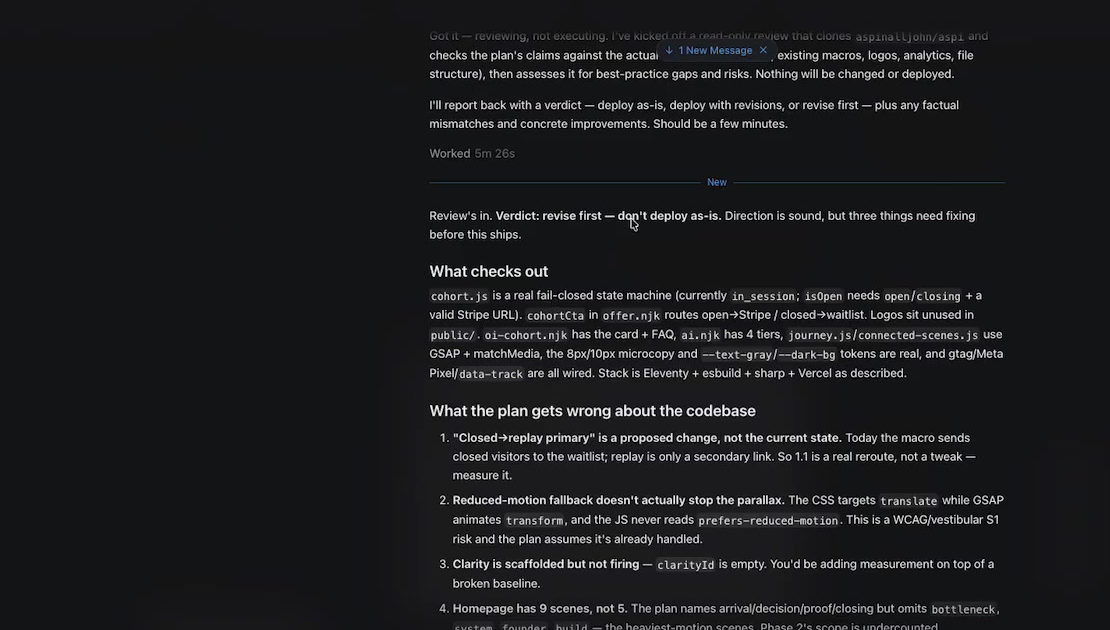
This is exactly where a Project becomes more valuable than a generic knowledge base. A knowledge base can preserve information. A Project can preserve information and use active agents to test that information against the current state of the work.
The creator laughs at the fact that GLM 5.2 is effectively disagreeing with a plan that GLM 5.2 helped produce earlier. That is the right reaction. Model consistency is not the same thing as correctness. The second run has different evidence, different context, and a different job.
For non-developers, that suggests a strong operating rule:
1. Ask for a plan.
2. Ask a separate agent or Project to audit the plan against reality.
3. Do not authorize implementation until the audit explains the gaps.
The project page turns technical work into visible state
Once the review is complete, Cursor offers to convert the findings into a revised executable plan. The creator then notices the Project’s organizational layer: project notes, shared context, agents, findings, execution phases, and “next from” items.
That structure is the feature he had been missing in normal AI chats.
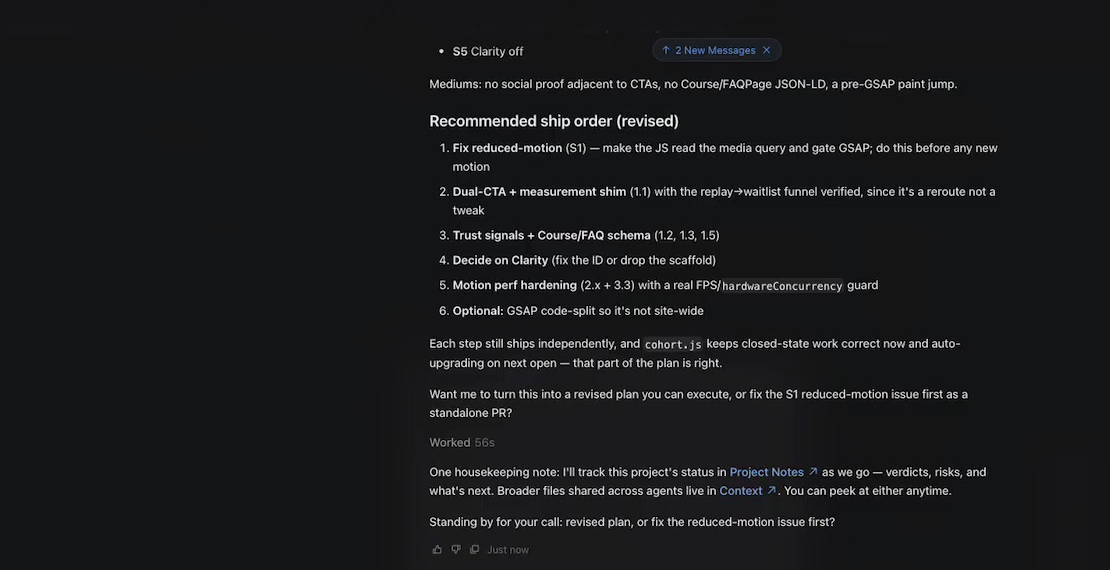
In the video, the revised plan is not merely pasted into the chat and forgotten. It becomes part of the Project. The interface can show what has already happened, what is being worked on, what remains, and what input is needed from the user.
Cursor’s current documentation describes the same idea as shared context. Each Project maintains files that sync across the machines used by its agents. Agents can add research, artifacts, and instructions they learn about the codebase or the user’s preferred way of working. The goal is to avoid re-onboarding every new agent from zero.
This is one reason Projects can feel more intuitive than a collection of disconnected coding sessions. The state is explicit.
Then the creator changes the instruction: revise it and execute
After seeing the review, the creator tells the Project to turn the findings into a revised plan and then go ahead and execute it. He is not prescriptive about whether Cursor should rewrite the plan first or simply begin implementing the corrections. He gives the coordinator the goal and lets it choose the sequence.
That is close to how Cursor says Projects are intended to work. The coordinator is there to manage the work at a higher level. It delegates coding tasks to agents and stays responsive while those agents execute.
On screen, Cursor writes a revised plan, stores it in project context, starts a worker, clones the repository, creates a branch, and begins moving through implementation phases. The Project panel presents the work as a checklist.
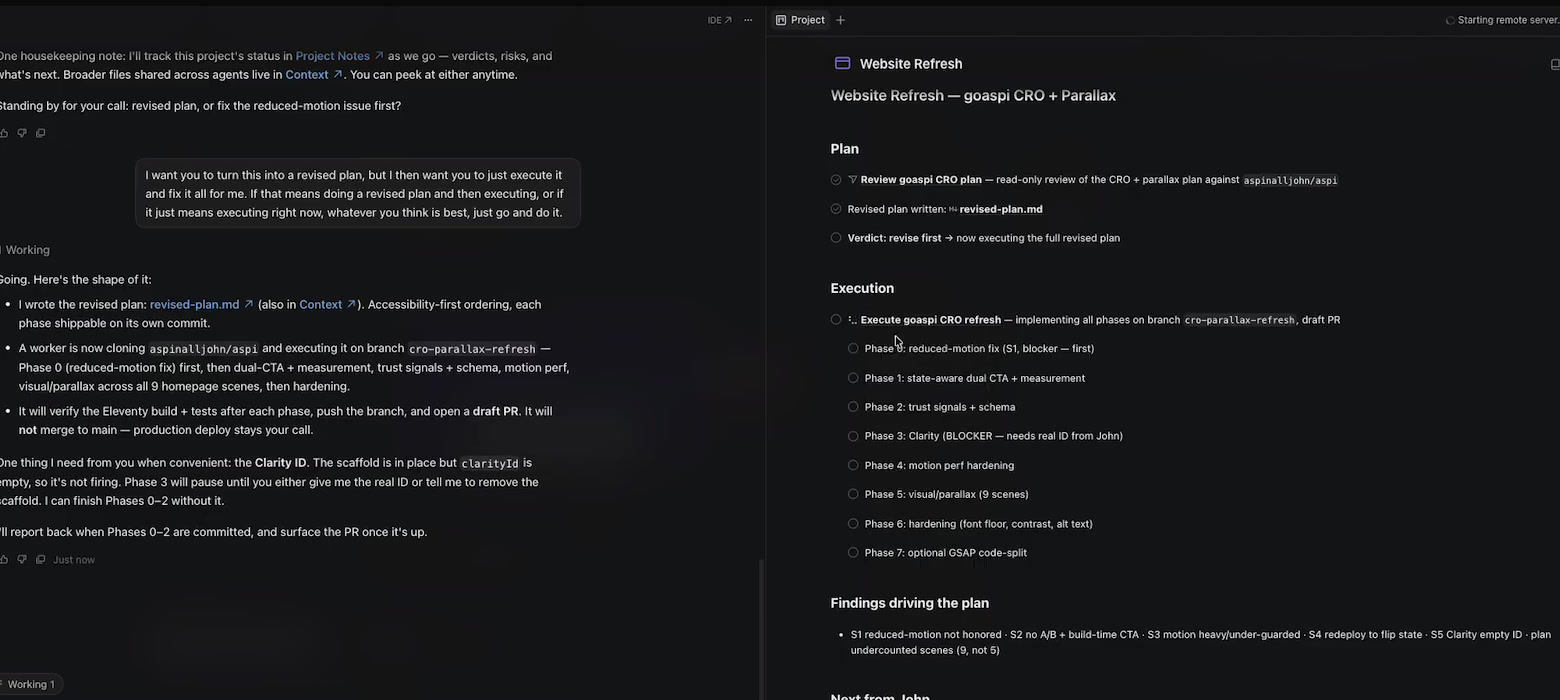
For a developer, the meaningful details include the branch, tests, commits, and pull request. For a non-developer, the meaningful detail is that these actions are no longer invisible. The interface turns them into status.
That is the part the creator keeps returning to: “we did this,” “this is upcoming,” and “this is being worked on.”
A non-developer can ask questions without stopping the whole job
During execution, the Project asks for a Microsoft Clarity ID. The creator does not know what that means, and he says so directly.
Instead of pretending, he asks: What is a Clarity ID? Do I need one? What should I do?
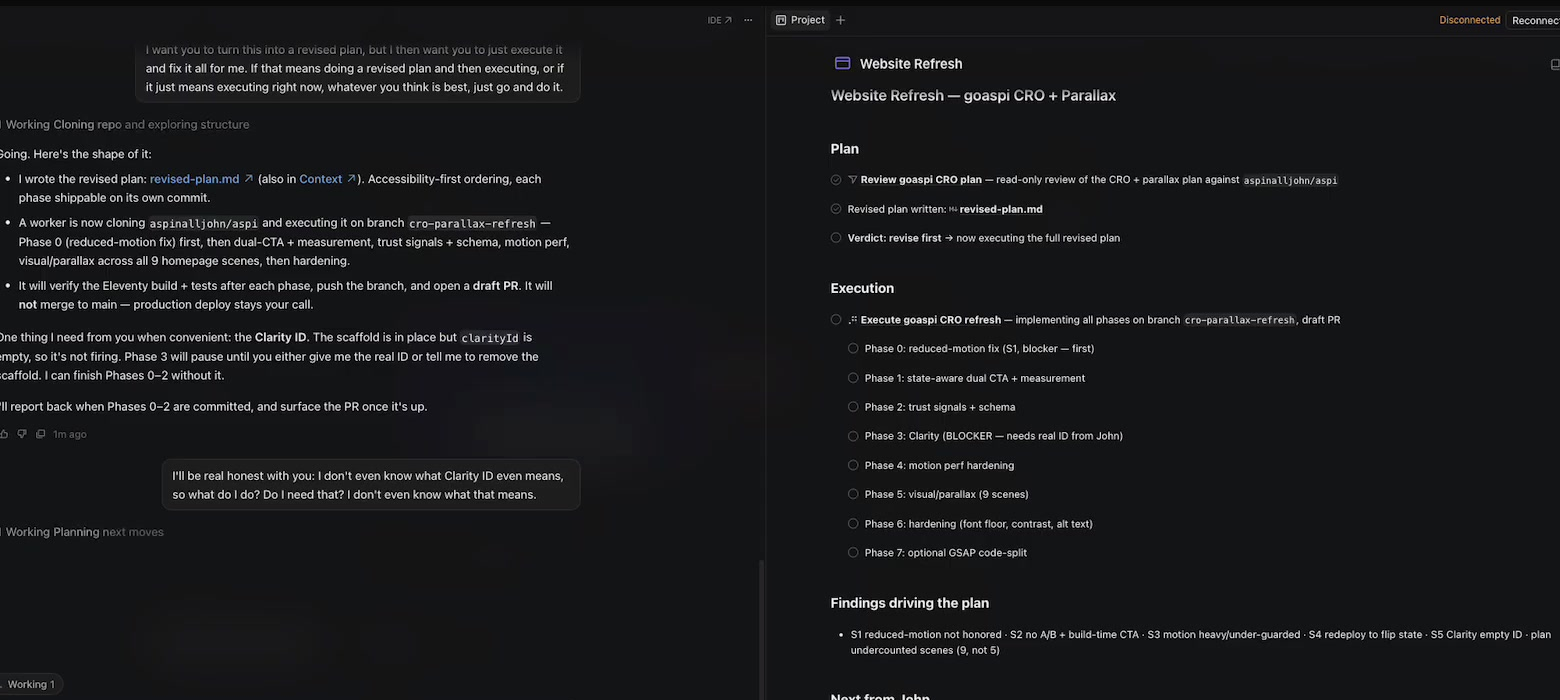
This small moment is one of the strongest demonstrations in the video.
A traditional coding workflow often pressures a non-technical project owner to translate uncertainty into a ticket, wait for a developer, or make a decision without enough context. Here, the user can ask the coordinator what a technical requirement means while an implementation agent continues working on other phases.
Cursor’s Project architecture helps here because the coordinator delegates rather than doing all execution itself. It can remain available for direction while agents are busy.
That does not remove the need for judgment. If analytics, billing, authentication, production deployment, or sensitive data is involved, the user still needs to understand the consequence before approving a change. But the conversation can stay in ordinary language while the technical state remains attached to the project.
The visible checklist is the real non-developer feature
Toward the end of the video, the right-hand Project panel shows the whole website-refresh effort in one place: the read-only review, the revised plan, the verdict, the execution task, individual phases, findings, and what the creator needs to decide next.
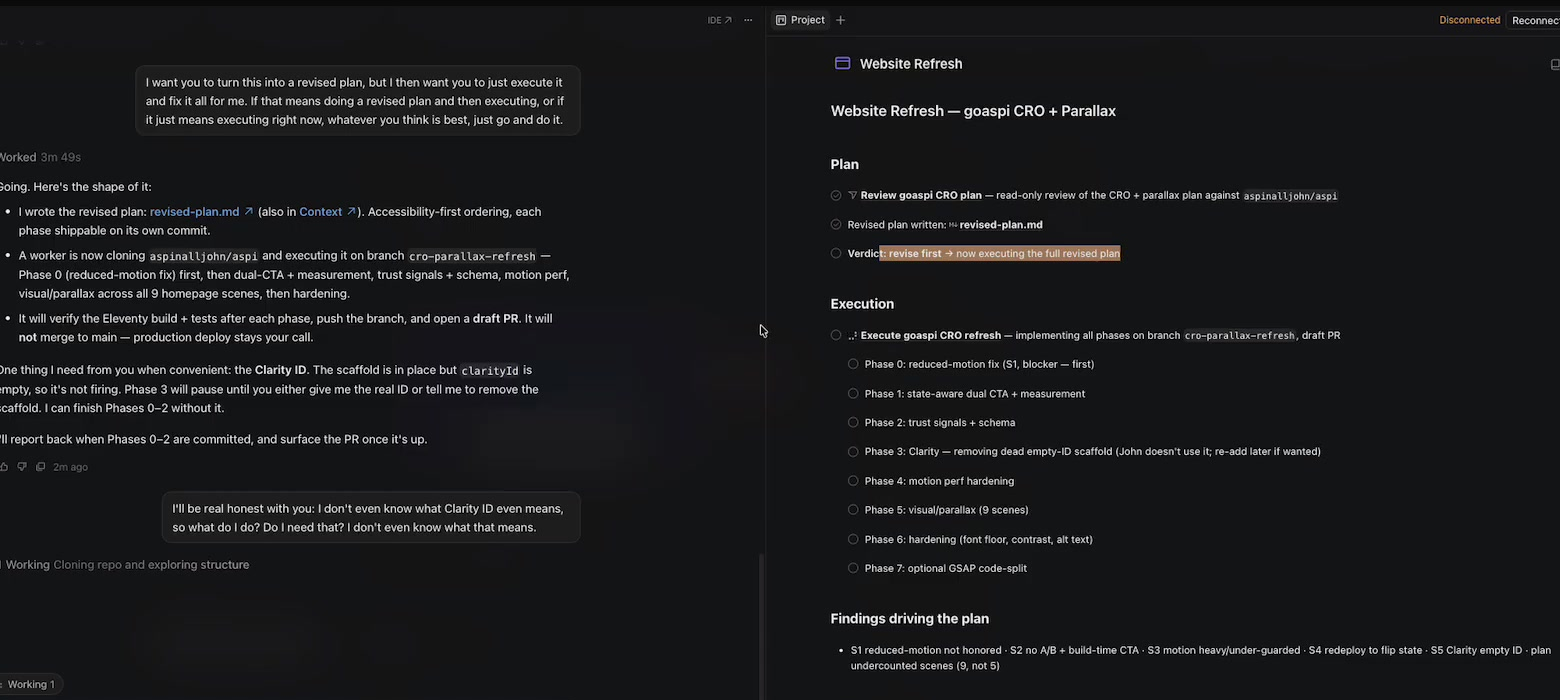
The creator explicitly contrasts this with his previous experience of accessing a repository directly through separate sessions. If he did something in one place, he could lose track of where that work belonged or what happened next.
Projects gives him a project-management layer on top of agentic coding.
For technical users, that layer may feel like a convenience. For non-developers, it can be the difference between “an AI is editing my code somewhere” and “I can see what this project is doing.”
Mobile monitoring is now an official part of the Cursor workflow
The video also mentions checking agents from the Cursor phone app. That capability is current.
Cursor’s iOS app is available on paid plans and can launch and manage cloud agents. It also supports remote control for local agents, with the important distinction that a remotely controlled local agent is still running on the user’s computer. The machine needs to stay on and online for that local-agent workflow. Cloud Agents, by contrast, run in isolated cloud environments and do not require the local computer to remain connected.
That distinction is useful for a non-developer because “I can see it on my phone” does not always mean “the work is running in the cloud.” Projects themselves are cloud-backed; local agents can still be involved when something needs to be tested on the user’s machine.
One claim in the video needs a current correction: SuperGrok Heavy
At the start, the creator says his SuperGrok Heavy subscription gives him access to Cursor. That should not be repeated as a current buying recommendation.
Cursor’s current billing documentation says that an eligible SuperGrok subscription can be linked to a Cursor account to grant Grok Bot usage. The link does not turn into a Cursor Pro, Pro Plus, or Ultra subscription and does not replace the user’s existing Cursor plan. Cursor also says linked SuperGrok usage does not stack on top of an existing paid Cursor grant.
So the safe current interpretation is:
• SuperGrok Heavy can grant high-tier Grok Bot usage when linked.
• It is not currently documented as including a full Cursor paid plan.
• Projects themselves are a paid Cursor feature, not a benefit that should be assumed from a SuperGrok purchase.
This is a good example of why AI-tool articles need current verification even when the workflow in the source video is still valuable.
What Projects does not solve
The interface is friendlier, but it does not eliminate the realities of software work.
You still need a real repository and an environment that agents can work with. Projects is built around software work such as features, migrations, apps, and repositories. It is not a generic project-management replacement for every kind of business process.
Cloud execution has privacy implications. Cursor says Projects run on Cloud Agents, which is why Legacy Privacy Mode is not supported for Projects. Organizations with strict code-handling requirements should review Cursor’s current security and data-governance documentation before enabling this workflow.
A checklist is not the same as proof. The Project can show that a phase is complete, but a user should still inspect artifacts, tests, previews, or the resulting pull request before merging production changes.
Model quality varies. The source itself demonstrates this: a plan produced by one model run is criticized by another run of the same model family once the repository is inspected. Slower or more expensive does not automatically mean correct, and fast does not automatically mean superficial.
Usage is not unlimited. The creator likes having models in one place without separately managing API keys. That convenience sits on top of Cursor’s own plan allowances and usage accounting.
A safer Cursor Projects workflow for non-developers
The video suggests a practical operating pattern that is worth copying.
Our Cursor AI Review 2026 explains the agent features and limits behind this project workflow.
New users can start with our Cursor crash course before moving into multi-step projects.
For engineering practices behind review and execution, see our Cursor senior engineer workflows guide.
1. Create one Project around one durable outcome
“Refresh the website” is better than a vague project called “website stuff.” A clear outcome gives the coordinator something stable to organize around.
2. Connect the correct repository
The Project needs the workspace that actually contains the code you want changed. Confirm the repository before asking an agent to execute anything.
3. Start in review-only mode
If you already have a plan, prompt, requirements document, or AI-generated recommendation, ask the Project to compare it with the repository before making changes.
A useful instruction is:
| Review this plan against the current codebase. Do not execute it. Identify incorrect assumptions, missing risks, and anything that would make deployment unsafe. Return a clear verdict: deploy as-is, revise, or reject. |
|---|
4. Read the verdict, not just the summary
Look for concrete evidence: wrong file assumptions, missing accessibility behavior, broken analytics scaffolding, incorrect page counts, dependencies that are not present, or deployment steps that do not match the actual project.
5. Ask for a revised plan with visible phases
Once the gaps are understood, have the Project turn the review into a staged plan. The stages should be independently reviewable where possible.
6. Authorize execution only after the plan makes sense
For low-risk work, that may simply mean “go ahead.” For production systems, add approval boundaries around deployment, billing, authentication, data deletion, or external services.
7. Ask plain-language questions when something blocks you
Do not fake technical knowledge. If Cursor asks for an ID, secret, environment variable, DNS change, or analytics setting you do not understand, ask what it is, why it is needed, and what happens if you skip it.
8. Review the output before merging
Use the Project checklist to understand state, then inspect the artifacts, tests, branch, preview, or pull request that proves the work is ready.
Why Projects may matter more to non-developers than another smarter model
Much of the AI-coding conversation focuses on which model is smartest this month. The video makes a different point.
For a user who is not a developer, the biggest improvement may not be another benchmark gain. It may be legibility.
A Project gives the work a home. It keeps the plan, review, findings, context, agents, execution status, and next decisions together. It lets the user say “review this first,” then “revise it,” then “execute it,” then “explain this thing I don’t understand” without rebuilding the context from scratch each time.
Cursor still remains a software-development tool. GitHub, branches, pull requests, analytics IDs, tests, and deployment decisions do not disappear. What Projects adds is a layer that lets someone who is not fluent in all of those concepts follow the work anyway.
That is why the feature finally makes sense in this example. The user is not trying to become a developer before refreshing his website. He is trying to become a better supervisor of an AI development process.
And that is a much more achievable job.
Current-source notes
Product behavior was checked against Cursor’s current documentation on October 9, 2026. The most relevant official sources are:
• Cursor Projects documentation: https://cursor.com/docs/agent/projects
• Cursor Projects launch announcement: https://cursor.com/changelog/projects
• Cursor Cloud Agents documentation: https://cursor.com/docs/cloud-agent
• Cursor models and pricing: https://cursor.com/docs/models-and-pricing
• Cursor usage and limits: https://prod.cursor.com/help/models-and-usage/usage-limits
• Cursor iOS app announcement: https://cursor.com/changelog/ios-mobile-app
• Cursor Grok Bot plans and billing: https://prod.cursor.com/help/grok-bot/plans